
Trace the design chain
Traceability in Design Control is not a document you assemble at the end. Every item carries the link to what it came from and the link to what proves it, so the chain is a property of the data itself, not something you reconstruct after the fact.
The space page also has a Traceability tab, next to its other four views. What follows here works from the link fields on each item, not from that tab.
The chain
The fields differ by item type, but the shape repeats: a link up to where the item came from, a link down to what it produced, and a link across to whatever proves it.
What counts as covered
Coverage is not a judgement call. Each item type has a fixed bar, met only when specific links exist.
| Item | Covered when it has |
|---|---|
| Stakeholder need | At least one Derived Requirement, and at least one Linked Test (a validation test) or Validation Evidence. |
| Requirement | A Source link to its parent stakeholder need, at least one Linked Specifications entry, and at least one Linked Test (a verification test) or Verification Evidence. |
| Specification | A Source link to its requirement, and at least one Linked Test (a verification test) or Verification Evidence. |
| Test | At least one link, through Linked stakeholder needs, Linked requirements or Linked specifications. |
A specification with no linked Source requirement is orphaned and cannot be traced. A test that links to nothing proves nothing. Covered is a status you set by hand once every link above is in place, and it exists on stakeholder needs and requirements only: Manage stakeholder needs and Manage requirements each cover how to set it.
Link an item as you write it
- Open the item’s details panel from the table, by clicking the arrow on the left, or click the key to open the work item itself.
- Set Source first. An item with no source cannot be traced, whatever else you fill in around it.
- Add the downstream links as they come into existence: Derived Requirement on a stakeholder need, Derived Requirements on a system-level requirement, and Linked Specifications on a requirement once its specifications exist.Every link is set from the field itself, using the + control next to it. A linked item then shows its key and its current status, so you can see from one panel whether the thing you depend on is still in draft.
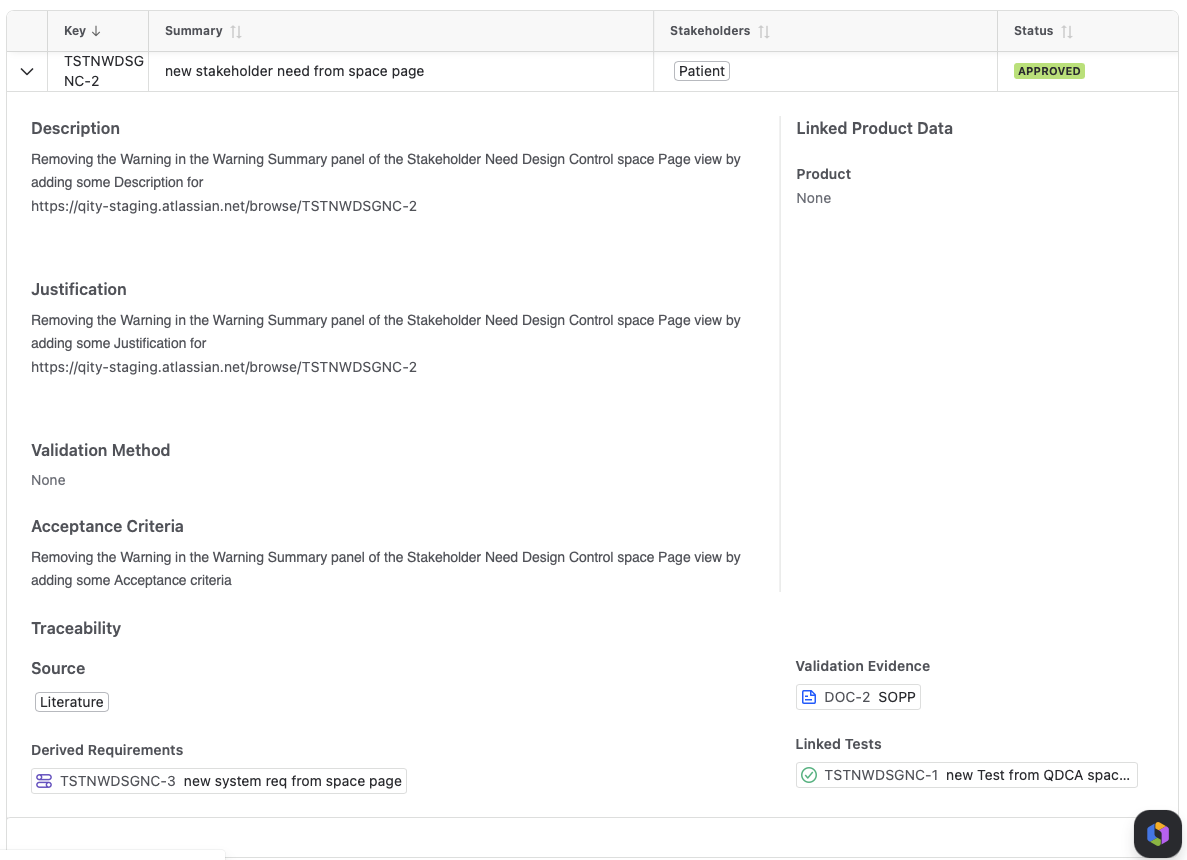
An approved stakeholder need, expanded to its Traceability group: Source, Derived Requirements, Validation Evidence and Linked Tests, next to its Linked Product Data group. - Add the Linked Test once the test exists, and the matching Verification Evidence or Validation Evidence once it is available.
- Fill in Product, Part, Software System and Software Item under Linked Product Data, so a later change to a part or a software item can be assessed for what it affects.
Find the gaps
Two views in the app surface what the chain is missing, without opening every item by hand.
- The Warnings card above each view counts the items that are incomplete, with rows such as No linked requirements, Validation evidence missing, Description missing, Justification missing and Acceptance criteria missing. Working the count down to zero is the fastest coverage check the app offers.
- The filter bar above each table narrows the view by Product, Type, Category, Status, Part and Software Item, so you can check coverage one slice at a time instead of across the whole space.
The two passes that catch what is missing
Design Control finds requirements in two passes, run in order, so a gap in one direction gets caught by the other.
- A top down pass derives requirements from each approved stakeholder need, checking which categories apply to what comes out of it.
- A bottom up pass starts from the list of categories and finds requirements that no stakeholder need produced. Where none matches, the answer is a new stakeholder need, not an orphan requirement.
- A system architecture usually triggers a third pass, generating further requirements once it exists.
See Manage requirements for how each pass runs in practice.
Where risk controls join the chain
Risk management is not separate from traceability. Every risk control is a requirement carrying the category Risk Control, so it traces through the same Source and Mitigated Risk links as any other requirement, rather than living in a separate system.
Where the chain becomes a document
Each view exports into a controlled document in Confluence through its own macro, and the links travel with the content, so the released document and the Jira data do not drift. See Document Control overview for how a controlled document is drafted and released. Each guide for an item type has the export steps for its own kind.